Give faithfully. See it clearly.
Tithe & Giving Tracker
Give faithfully. See it clearly.
A calm, focused Excel + Google Sheets-compatible workbook for tracking your tithe, offerings, missions, and the family you support — driven from one month/year control cell.
Launch price: $9 for v1 customers. Future versions may increase as features are added.
Secure checkout via Stripe · instant download · personal use license
- Instant digital download
- Secure checkout via Stripe
- Excel + Google Sheets compatible
- Personal use license
- Apple Numbers not supported
- Not financial, tax, legal, or investment advice
- 4-tab Excel workbook (.xlsx) — opens in Excel and Google Sheets
- Read Me First guide (.txt)
- Google Sheets upload instructions (.txt)
- Sample Data guide (.txt)
- Terms of Use (.txt)
- Free v1.x updates
Best used with Microsoft Excel or Google Sheets. Apple Numbers is not recommended.
Need help opening your file? Email support@wealthbyfaith.store and we'll help you get started.
Most budget tools treat giving as an afterthought. This one makes it the whole point — a private, peaceful place to honor what you've already decided in your heart to give.
Log your tithe, offerings, missions, and family support. The Giving Dashboard rolls it up by month and year so you can see your faithfulness clearly, without guilt or guesswork.
Works in Microsoft Excel and Google Sheets. No subscriptions. Apple Numbers not supported.
“Each of you should give what you have decided in your heart to give.”— 2 Corinthians 9:7
4 connected tabs
Each tab does its part. Together, they tell the truth about your money.
🌿 Start Here
Welcome, scripture, and a 4-step onboarding rhythm.
⚙️ Setup
Set your current month + year and customize the giving + payment dropdown lists.
🕊️ Tithe & Giving
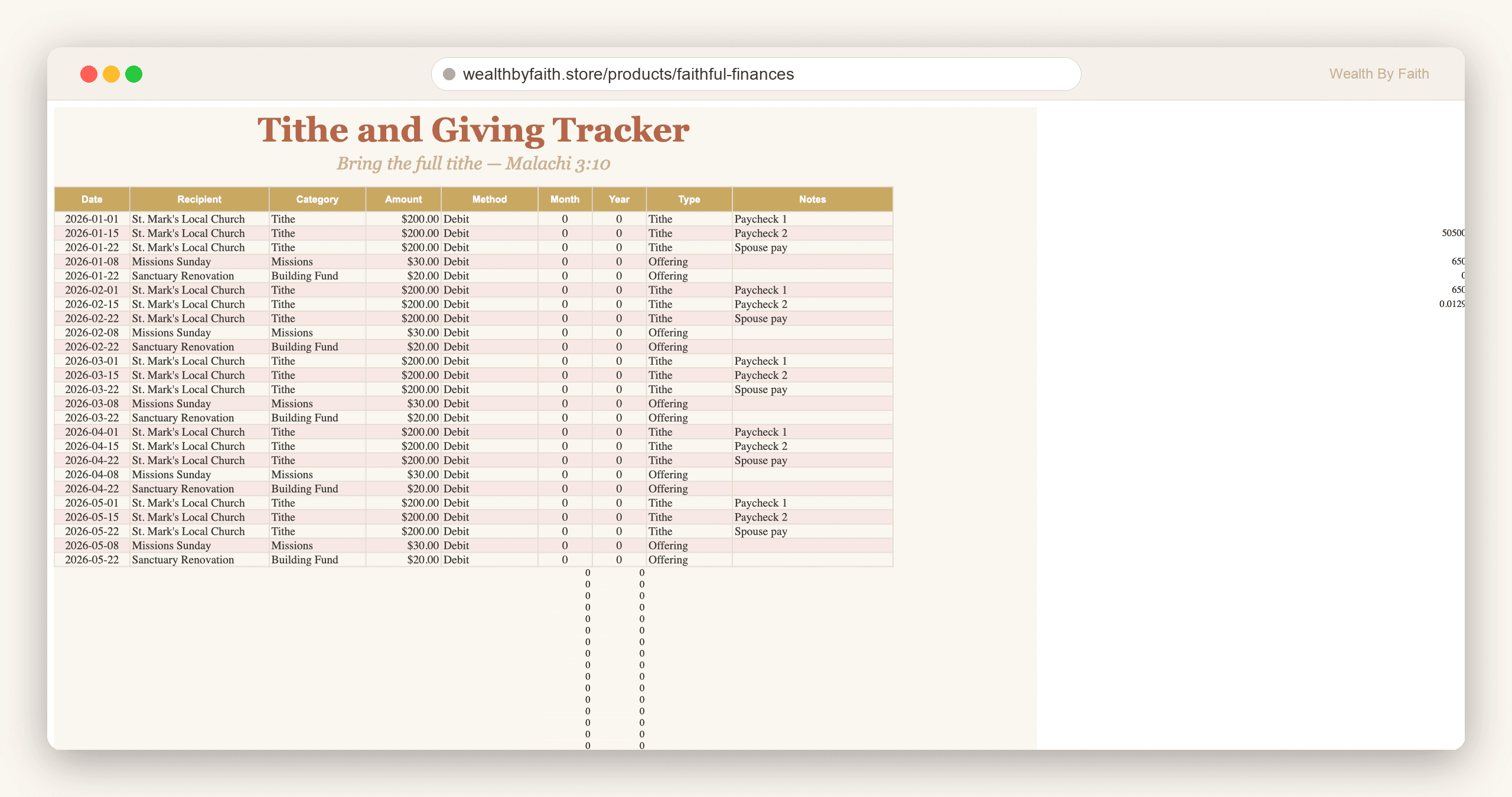
The giving log — date, recipient, category, amount, method. Month & year fill in automatically.
📊 Giving Dashboard
Tithe, offerings, missions, family support — this month and year-to-date, at a glance.
Preview the Faithful Finances Workbook
Calm, consistent design across every screen. Brand-aligned colors. Quiet typography.
Log tithe, offerings, missions, and family support in one place.
- You tithe and want to see your faithfulness clearly.
- You give to missions, your church, or family — and want it all in one place.
- You send money home and want a calm record of it.
- You like Excel or Google Sheets.
- You want a small, focused tool — not a whole budget system (yet).
- You want a full budget system — see the Faithful Finances Budget Planner Bundle.
- You want a mobile app.
- You do not want to use Excel or Google Sheets.
- You want tax-deductible-giving or legal advice.
FAQ
What software do I need?
+
Microsoft Excel or Google Sheets (free). Apple Numbers can corrupt the file — please don't open it there.
How is this different from the full Bundle?
+
This is a focused, single-job tracker just for giving. The Faithful Finances Budget Planner Bundle is the full 14-tab money system. Many people start here and upgrade later.
How do I get my file after purchase?
+
You'll be redirected to a Thank You page with an instant download link. We also email it to you. The file is yours forever.
Will I get updates?
+
Yes — v1 buyers get free v1.x updates for as long as v1 is shipping.
Refunds?
+
Because this is a digital download you can keep forever, we don't offer refunds. If something isn't working, email support@wealthbyfaith.store and we'll make it right.
Ready to begin?
Every dollar is on assignment. Let this workbook help you give them a name.
Best used with Microsoft Excel or Google Sheets. Apple Numbers is not recommended.
This product is for personal record-keeping and educational purposes only. It is not financial, legal, tax, or investment advice.